Remote interview setup: how to look and sound professional on Zoom
Creating Your Professional Virtual Presence
Creating Your Professional Virtual Presence
Optimizing Camera Position and Framing
Your camera position sets the foundation for a professional virtual presence. Position your camera at eye level to create natural eye contact with interviewers—this mimics in-person conversation dynamics and projects confidence. Cameras placed too low create an unflattering upward angle, while high-mounted cameras make you appear diminished and disconnected.
Frame yourself from mid-chest up, leaving appropriate headroom above your head. Your face should occupy the central third of the screen, creating balanced composition that keeps attention on your expressions and engagement. Too much headroom makes you appear small and distant, while too little feels cramped and claustrophobic.
Before any interview, conduct a thorough test of your setup. Sit at your normal distance from the camera and review the framing on screen. Adjust your chair height or camera position until the angle feels natural and professional. This preparation eliminates technical distractions during your actual interview, allowing you to focus entirely on showcasing your qualifications and connecting with your interviewer.
Mastering Lighting and Visual Quality
Lighting transforms how you appear on camera more than any other factor. Position yourself facing a window to harness natural light, which provides the most flattering illumination throughout the day. If natural light isn't available or consistent, affordable ring lights or LED panels placed directly in front of you eliminate unflattering shadows that obscure your facial features and expressions.
Never sit with a window behind you. Backlighting creates a silhouette effect that makes your face appear dark and your expressions unreadable, undermining the personal connection essential to successful interviews. If you have no choice but to face away from a window, close the blinds and rely entirely on artificial lighting.
Beyond positioning your light sources, optimize your camera settings. Adjust brightness, contrast, and if available, aperture settings to ensure your video appears crisp and professional. Pay attention to color temperature—your lighting should render your skin tones naturally rather than casting overly warm orange hues or cool blue tints that appear artificial and distracting.
Selecting and Preparing Your Background
Your background communicates as much about your professionalism as your appearance. Select a clean, uncluttered space that conveys competence without revealing overly personal details. Avoid positioning yourself in front of unmade beds, visible laundry, or busy patterns that compete for viewers' attention.
Lighting your background matters as much as lighting your face. Ensure the area behind you is evenly illuminated, eliminating harsh shadows or dark corners that create visual imbalance. A well-lit background appears intentional and polished rather than haphazard.
Position yourself with adequate space between you and the wall—ideally three to five feet. This distance creates depth and dimension, preventing the flat, cramped appearance that occurs when sitting directly against a surface. The separation adds visual interest and makes you appear more three-dimensional on screen.
Virtual backgrounds tempt many remote workers, but deploy them cautiously. Digital backgrounds frequently glitch, creating distracting halos or artifacts around your edges that undermine professionalism. If you must use one, test it thoroughly beforehand and ensure your system handles it smoothly without visual disruptions.
Achieving Crystal-Clear Audio and Technical Reliability
Audio Equipment and Sound Quality Essentials
Your audio quality can make or break a remote interview impression. While built-in laptop microphones might seem convenient, they often produce echo and muddy sound that forces interviewers to strain to understand you. Instead, invest in quality earbuds with an integrated microphone or a dedicated USB microphone designed for clear voice capture.
Microphone positioning matters significantly. Place your device about six to eight inches from your mouth, slightly off to the side to minimize breathing sounds and plosives while still capturing clear speech. This setup reduces background noise interference without sacrificing vocal clarity.
Before your interview, conduct a thorough audio test with a friend or record yourself speaking. Listen critically for echo, static, volume inconsistencies, or ambient noise that could distract from your responses. Many video platforms offer built-in test features that help identify technical issues.
Finally, select a quiet location for your interview and inform household members of your scheduled time. Even excellent equipment can't compensate for barking dogs, slamming doors, or unexpected interruptions that undermine your professional presentation.
Configuring Zoom Software Settings for Success
Beyond hardware preparation, mastering Zoom's software configuration ensures you'll navigate your interview smoothly without technical fumbles. Start by exploring Zoom's audio and video settings at least a day before your interview. Practice muting and unmuting yourself, starting and stopping your video, and adjusting volume levels until these controls become second nature.
If your internet connection reliably supports higher bandwidth, enable HD video in your settings to present the clearest possible image. Navigate to Settings > Video and check "Enable HD," but only if you've confirmed your connection stability through preliminary testing.
Optimize your audio by adjusting Zoom's background noise suppression features. Under Settings > Audio, enable "Suppress background noise" and set it to "Auto" or "High" depending on your environment. These enhancements can dramatically improve how professional you sound by filtering out ambient distractions.
Finally, if you'll present materials during your interview, test screen sharing functionality beforehand. Practice sharing specific windows rather than your entire desktop to maintain privacy and professionalism. This preparation prevents awkward fumbling when your interviewer asks you to demonstrate your work.
Ensuring Stable Connectivity and Technical Backup Plans
Your internet connection can make or break your interview experience. Whenever possible, use a wired ethernet connection instead of WiFi to ensure stable, reliable connectivity throughout your conversation. Before your interview begins, close unnecessary applications and browser tabs to dedicate maximum bandwidth and processing power to Zoom.
Always prepare a backup plan. Keep the interviewer's phone number readily available in case your connection fails, and have a fully charged mobile device as an alternative platform. If video delays occur, you can mitigate technical issues by moving closer to your Wi-Fi router [5].
Restart your computer before important interviews to clear memory and ensure optimal performance. Test your complete setup 24 hours beforehand, then run a final check 30 minutes prior to identify any last-minute issues. Consider using Audacity, a free software tool, to record and hear your microphone audio during quality testing [9].
These proactive measures transform potential technical disasters into minor inconveniences, allowing you to focus entirely on showcasing your qualifications and building rapport with your interviewer.
Presenting Yourself with Confidence and Professionalism
Body Language and Non-Verbal Communication
Your body language speaks volumes before you say a single word. In remote interviews, mastering non-verbal communication becomes even more critical since the camera amplifies every gesture and expression.
Start by looking directly at your camera lens rather than at your own image or the interviewer's face on screen. This creates genuine eye contact that builds connection and trust. Position your camera at eye level to avoid unflattering angles that undermine your professional presence.
Sit up straight with your shoulders back to project confidence and energy. Slouching signals disengagement and low enthusiasm—qualities no interviewer wants to see. Your posture directly influences how alert and interested you appear.
Use natural hand gestures within the camera frame to emphasize key points, but keep movements controlled. Excessive gesturing becomes distracting and pulls focus from your message.
Finally, smile genuinely and nod appropriately throughout the conversation. These simple actions demonstrate active listening and engagement, showing the interviewer you're fully present and invested in the discussion. Your facial expressions should reflect authentic interest in what's being said.
Professional Appearance and Presentation Standards
Your professional appearance creates an immediate impression that sets the tone for the entire interview. Dress professionally from head to toe, exactly as you would for an in-person meeting. This complete approach isn't just about what the camera sees—it mentally prepares you and builds the confidence that naturally radiates through the screen.
Select solid colors or subtle patterns that translate well on video. Busy stripes, intricate designs, or all-white clothing can create visual distractions or technical issues on camera. Blues, grays, and earth tones typically work best for virtual settings.
Pay careful attention to grooming details. Ensure your hair is styled, makeup (if applicable) is camera-appropriate, and you appear polished and put-together. These details matter more on video than you might think.
Always conduct a camera test before your interview. Colors and patterns can appear dramatically different through a webcam lens. What looks perfect in the mirror might create unexpected issues on screen. While appearance is considered the least important factor of the three pillars of executive presence [13], it still contributes to your overall professional image.
Engagement Strategies and Interview Best Practices
Eliminate distractions by silencing your phone, closing email, and putting a 'do not disturb' sign on your door. Keep notes and your resume nearby but off-camera so you can reference them naturally without obviously reading [5]. This preparation allows you to focus entirely on the conversation while maintaining access to key talking points.
Practice active listening by pausing before responding to ensure the interviewer has finished speaking and to avoid talking over them due to audio delays [3]. Hiring managers typically form their initial impressions within the first few minutes [20], making these early exchanges critical for establishing rapport.
Follow up immediately after the interview with a thank-you email that references specific conversation points to reinforce your professionalism. This demonstrates both attention to detail and genuine interest in the position.
Prepare for one-way video interviews by practicing speaking to a camera alone and maintaining energy without real-time feedback [5]. Most platforms impose time limits on responses and allow only one attempt to record answers [5], making advance practice essential for delivering confident, concise responses.
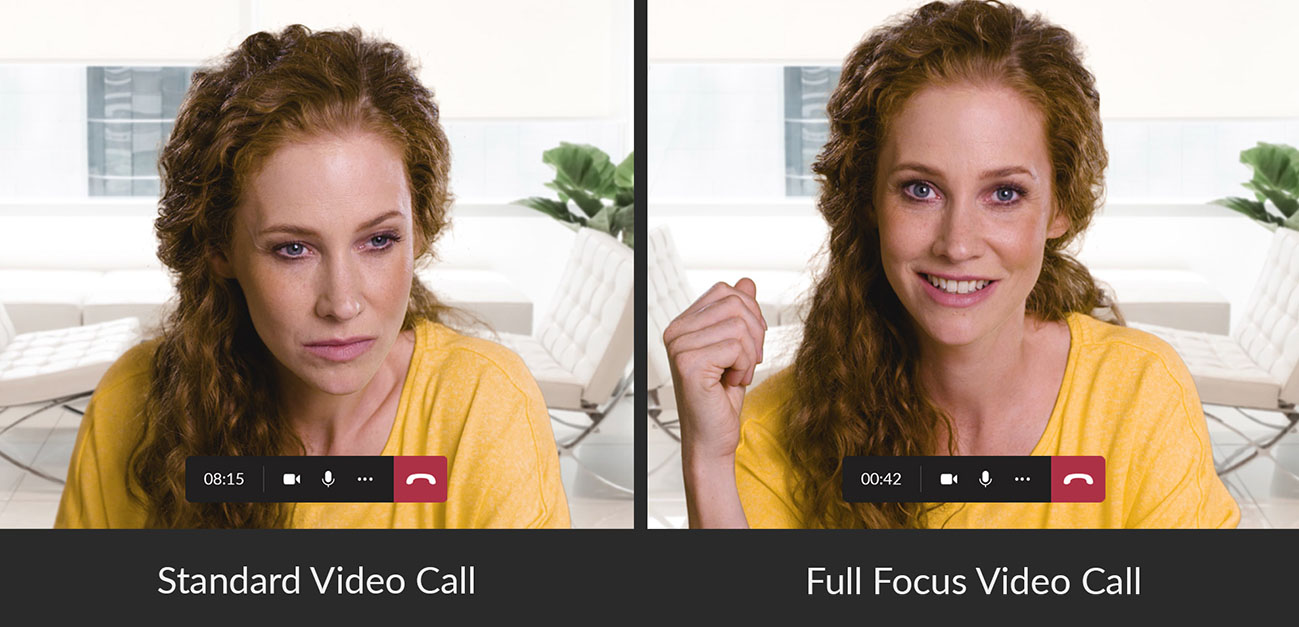
A comparison between looking at the screen (left) and looking directly into the camera (right) during a video call.
Try InterviewWhisperer on your next interview
A native macOS assistant that hears the question and answers on your screen, invisible to the screen share. Your first 30 minutes of live answers are free, no card.
Requires an Apple Silicon Mac (M1 or later) and macOS 12 or newer.
Practicing first? Try the free interview answer generator. It works on any phone.